Q-SYS Scheduler Suite
Time-based scheduling for UCI integration
Three scheduling plugins for UCI integration. Schedule by minute/hour/day, by hour/date/month, or by flexible per-slot day selection, with internal preset storage, reusable templates, and output control pins.
A suite of three scheduling plugins that can be added directly onto a UCI to give scheduling capability to the end user. Build your schedules once and move them to new designs easily. No more time wasted rebuilding schedules within Administrator for every job.
Plugins 1 and 2 include internal preset storage, so templates can be pre-made and transferred between designs. Data can be saved, loaded, or edited offline then pasted back into the text field.
Plugin 1 (v1.4): Scheduling by Minute, Hour, Day
Week-based schedule triggers. For example, at 9am on every weekday turn the amps on. Use the dropdown to select target days, enable control rows, and set time parameters. Trigger outputs activate continuously while the time is matched. Add more plugin instances if you need additional days.
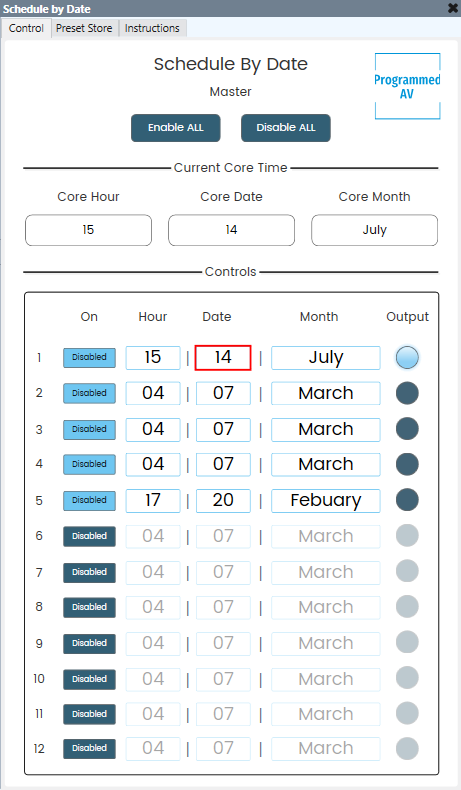
Plugin 2 (v1.0): Scheduling by Hour, Date, Month
Date-based schedule triggers. For example, on December 25th mute the system for a public holiday. Same workflow as Plugin 1 but oriented around specific dates and months rather than days of the week.
Plugin 3 (v2): Advanced Scheduler
Week-based scheduling with per-slot day selection. Where Plugin 1 targets one day per instance, every slot here picks its own day, so a single instance can run a different schedule for each day of the week.
Set the number of trigger slots from 1 to 10, choose 12 or 24 hour time, and give each slot either a preset day option (a single day, Mon-Thu, Weekdays, Weekend, or All) or a custom list such as Monday, Wednesday, Friday. Each slot has its own enable toggle, with enable-all and disable-all buttons for the whole plugin.
Each slot provides two outputs: a trigger pulse that fires once when the time is matched, and a boolean that stays high for the matching minute. The current day, hour, minute, and second are exposed as outputs as well.
Key Features
- Internal preset storage in Plugins 1 and 2
- Reusable templates transferable between designs
- Save, load, and edit data offline before pasting back into the text field
- Output control pins that drive logic or activate snapshots
- Per-slot day selection and one-shot trigger pulses in Plugin 3
- Support for multiple plugin instances for additional days or dates
Setup
Ensure the Core has the correct time. An NTP server is recommended (requires internet connectivity). Use the dropdown to select target days, enable control rows and set time parameters, then wire the output control pins to drive your logic or snapshots.
Licensing
One-time purchase. One license key per core; unlimited use.